



MINECRAFT MINING MOD

Get Easy Mass Block Mining & Fast Harvesting with FTB Ultimine

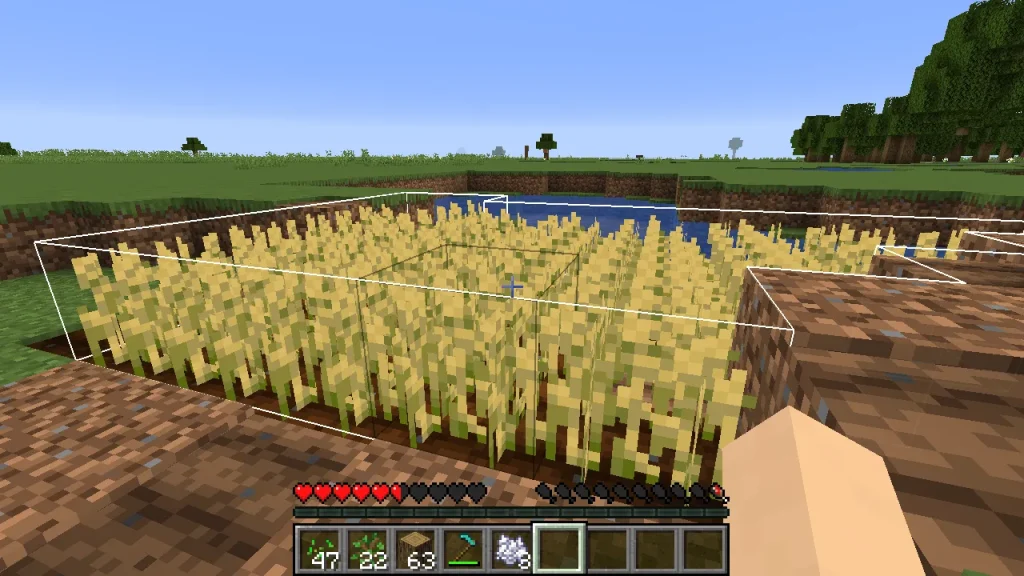
FTB Ultimine is a powerful Minecraft mod that allows you to mine multiple blocks instantly. Speed up your gameplay, clear large areas, and harvest resources efficiently with just one key press.

Lets Get Started

Easy Installation Steps

people.jpg
people-1.jpg
people-in-the-fall.jpg
0
+
Releases

01

Download the Mod

Download FTB Ultimine from GitHub or CurseForge and get the latest version for your Minecraft setup.

02

Install & Configure

Install Forge or Fabric, place the mod in your mods folder, and customize settings as needed.

01

Start Mining Faster

Launch Minecraft and use Ultimine to break multiple blocks instantly and boost your gameplay.

All In One

One Mod For Faster Mining & Efficient Resource Collection

FTB Ultimine is an all-in-one mining solution for Minecraft players. It helps you break multiple blocks instantly, clear large areas, and improve your overall gameplay efficiency with minimal effort.

OUR MOD FEATURES

What FTB Ultimine Can Do

Smart Block Mining

Mine multiple connected blocks instantly and save time while exploring caves or digging tunnels.

Advanced Mining Controls

Customize how Ultimine works with different shapes, limits, and keybinds to match your playstyle.

Lets

WHY CHOOSE ULTIMINE

Boost Your Mining Efficiency & Enhance Your Minecraft Experience

FTB Ultimine transforms the way you play Minecraft by making mining faster, easier, and more efficient. Spend less time grinding and more time building, exploring, and enjoying your world.

Smart Mining System

Instantly mine connected blocks with advanced detection for faster resource collection.

Optimized Performance

Designed to run smoothly without lag, ensuring a seamless and responsive gameplay experience.

Custom Controls & Settings

Fully customizable keybinds and options to match your preferred mining style.

Efficient Resource Gathering

Maximize productivity and gather more resources in less time with minimal effort.

NEED HELP?

cloudcorex4@gmail.com

nice-positive-woman-entering-her-bank-card-number.jpg

Don't Choose Wrong

Everything You Need To Know About FTB Ultimine

Have questions about installation, features, or compatibility? Here are some common answers to help you get started with FTB Ultimine quickly and easily.

Reading Blog

Our Blog Content

Stay updated with the latest news, guides, and tips about FTB Ultimine. Learn how to improve your mining efficiency and get the most out of your Minecraft experience.
What is FTB Ultimine?
FTB Ultimine is a Minecraft mining mod that allows players to mine multiple blocks at once instead of breaking them one by one. It helps speed up mining, clear large areas quickly, and gather resources more efficiently with a single key press.

Key Points About FTB Ultimine

  • Mine multiple connected blocks instantly
  • Clear tunnels, caves, and large areas faster
  • Customizable mining shapes and controls
  • Works with many modpacks and versions
  • Designed to improve gameplay efficiency
Yes, FTB Ultimine is completely free to use. You can download and use the mod for free. It’s available for free download on platforms https://ftbultimine.com/.

Quick Answer

Installing FTB Ultimate is quick and only takes a few minutes. Follow these simple steps:

Step-by-Step Installation

  1. Download the Mod
    Download the latest version of FTB Ultimine from your official website.
  2. Install Forge or Fabric
    Make sure you have a supported mod loader, such as Forge or Fabric, installed.
  3. Move File to Mods Folder
    Place the downloaded FTB Ultimate file into your Minecraft mods folder.
  4. Launch Minecraft
    Start Minecraft with Forge or Fabric selected.
  5. Start Using Ultimine
    Join your world and start mining multiple blocks instantly.

Quick Tip

  • Make sure your Minecraft version matches the mod version.
  • Use the latest version for best performance.
  • Installation usually takes only a few minutes.
FTB Ultimine supports multiple Minecraft versions, depending on the mod release and modpack compatibility.
Commonly supported versions include:
  • Minecraft 1.12.2
  • Minecraft 1.16.5
  • Minecraft 1.18.2
  • Minecraft 1.19+ (depending on updates)
Support may vary depending on the mod loader you use, such as Forge or Fabric. To ensure compatibility, always download the version that matches your Minecraft installation.
Yes, FTB Ultimine supports both Forge and Fabric, depending on the available version of the mod.
Different releases of FTB Ultimine are built for specific mod loaders, so you need to download the version that matches your setup. Using the correct loader ensures proper functionality and prevents compatibility issues with other mods.
Before installing, make sure to:
  • Check your Minecraft version
  • Confirm your mod loader (Forge or Fabric)
  • Download the matching FTB Ultimine version
To activate FTB Ultimine in Minecraft, you need to use the assigned hotkey while mining blocks.
By default, you can hold the Grave/Tilde key (~) or the configured key to enable Ultimine. When activated, breaking one block will mine multiple connected blocks at once, depending on the selected mode.
You can also customize controls and mining modes in the in-game settings:
  • Open Controls in Minecraft settings
  • Search for FTB Ultimine
  • Change the activation key if needed
  • Select mining shapes or modes
Yes, FTB Ultimine allows you to customize how mining works in Minecraft.
You can adjust different settings directly in-game, including:
  • Changing the activation key
  • Selecting different mining shapes or modes
  • Limiting the number of blocks mined
  • Adjusting tool durability usage
  • Configuring block whitelist or blacklist
These customization options help you control how Ultimine behaves and make mining more efficient, tailored to your gameplay style.
FTB Ultimine can have a minor impact on game performance, but in most cases, it runs smoothly with no noticeable issues.
Since it allows multiple blocks to be mined at once, it may slightly increase CPU usage during large mining actions, especially when breaking many blocks in a single operation. However, the effect is usually minimal on modern systems.
Performance can vary depending on:
  • Number of blocks mined at once
  • Overall modpack size and complexity
  • System hardware performance
For most players, FTB Ultimine remains optimized and does not significantly reduce FPS or game stability during normal gameplay.
👉 Download FTB Ultimine here: https://ftbultimine.com/downloads/
Yes, FTB Ultimate is safe to use in Minecraft modpacks when it is included in a compatible and properly configured modpack.
 
It is widely used across popular modpacks and designed to work alongside other mods without causing issues. Since it only modifies mining behavior, it does not interfere with world data or core game files. However, compatibility depends on the modpack version and mod loader (Forge or Fabric), so it is important to ensure the correct version is installed to avoid conflicts with other mods.
You can get the latest updates and support for FTB Ultimine from its official channels and trusted sources.
  • The latest versions, changelogs, and updates are available through official releases
  • Technical support and bug reports are handled via community support platforms like GitHub or Discord
  • Guides and discussions are available in official Minecraft modding communities
For convenience and safety, you can also download the latest version directly from our official page:
👉 https://ftbultimine.com/download/